

Securing Enterprise AI with Weaviate


Why Enterprise Security Is Different
Our introductory guide to Weaviate security covered the fundamentals — API keys, OIDC basics, and role-based access control. Those building blocks get you far, but enterprise environments bring a different set of challenges: hundreds of users across multiple teams, regulatory compliance (GDPR, HIPAA, SOC 2, PCI DSS, FedRAMP), and the expectation that your vector database integrates with the identity infrastructure you've already invested in.
To make this concrete, we'll follow MedVector Health — a fictional health-tech company that built an AI-powered clinical search tool on Weaviate. Early on, five engineers shared two API keys. It worked fine. Then they onboarded their first hospital client, hired 40 more people, and got a call from their compliance team: a HIPAA audit was six months out. Their two original API keys had quietly become twelve, spread across Slack messages and .env files. When a contractor's engagement ended, nobody was sure which keys they'd had access to.
What follows is how MedVector went from startup security to enterprise-grade — and how each layer they added answered a specific question their security auditors would eventually ask.
1. OIDC Integration for Enterprise Authentication
"How do your users authenticate, and what happens to credentials if your database is compromised?"
MedVector's first move was to connect Weaviate to their existing identity provider. No more shared API keys passed around in Slack. When their auditors eventually asked about credential storage, the answer was simple: "We don't store credentials. Authentication is delegated to our IdP."
OpenID Connect (OIDC) is the foundation of enterprise authentication in Weaviate. By adopting OIDC, Weaviate eliminates the need to create isolated credential stores and instead integrates with your existing Identity Provider (IdP).
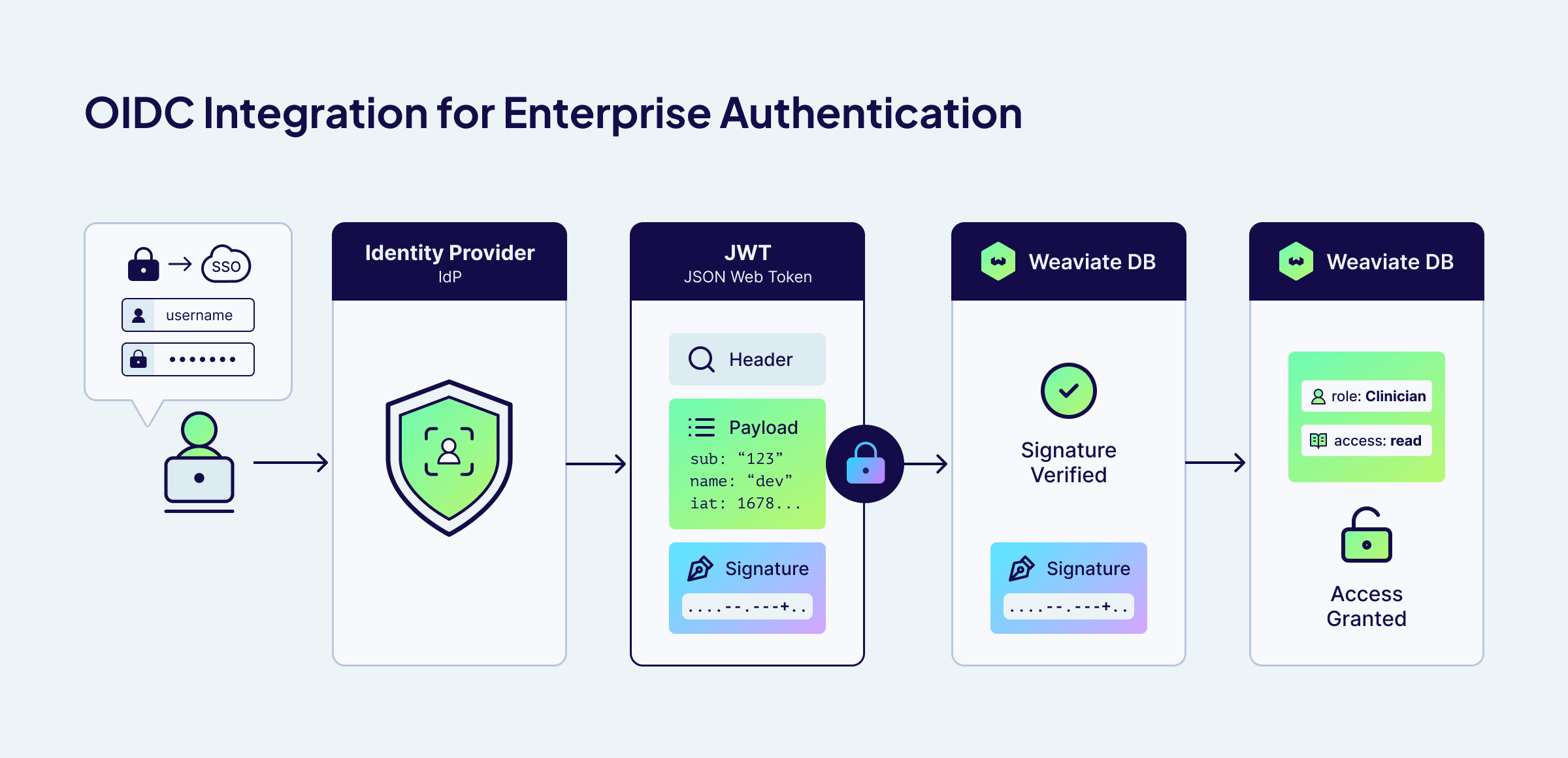
The security workflow with OIDC:
- Delegated Authentication: Users authenticate with your IdP, not Weaviate.
- Token-Based Access: The IdP generates a short-lived, cryptographically signed JSON Web Token (JWT).
- Zero-Knowledge: Weaviate validates the token but never sees or stores user credentials.
This architecture drastically reduces your attack surface. Even in the unlikely event of a database compromise, there are no passwords to steal—only expired or short-lived tokens that are useless on their own.
Weaviate supports any OIDC-compliant identity provider, including Okta, Microsoft Entra ID (Azure AD), Auth0, Google Workspace, Keycloak, and more.
Read more about OIDC integration in the official Weaviate documentation.
If you're running a local open-source installation and need help setting up IdP integration, Weaviate offers Assurance — a paid support package that includes hands-on guidance for configuring OIDC, SSO, and other enterprise security features in self-hosted environments.
2. Enterprise RBAC at Scale
"Who can access patient records, and can you prove least privilege?"
MedVector's first hospital client required that their patient-facing search app could query medical literature but never touch PHI (Protected Health Information). This forced MedVector to move beyond simple role assignment and define a strict access matrix.
Beyond basic role assignment, enterprises need authorization policies that handle real-world complexity: multiple teams sharing infrastructure, strict data isolation requirements, and the principle of least privilege applied consistently.
MedVector manages three collections with very different sensitivity levels:
MedicalArticles— Publicly available medical literaturePatientRecords— PHI, subject to HIPAA- dev collections — Environments for development and experimentation, isolated from production data
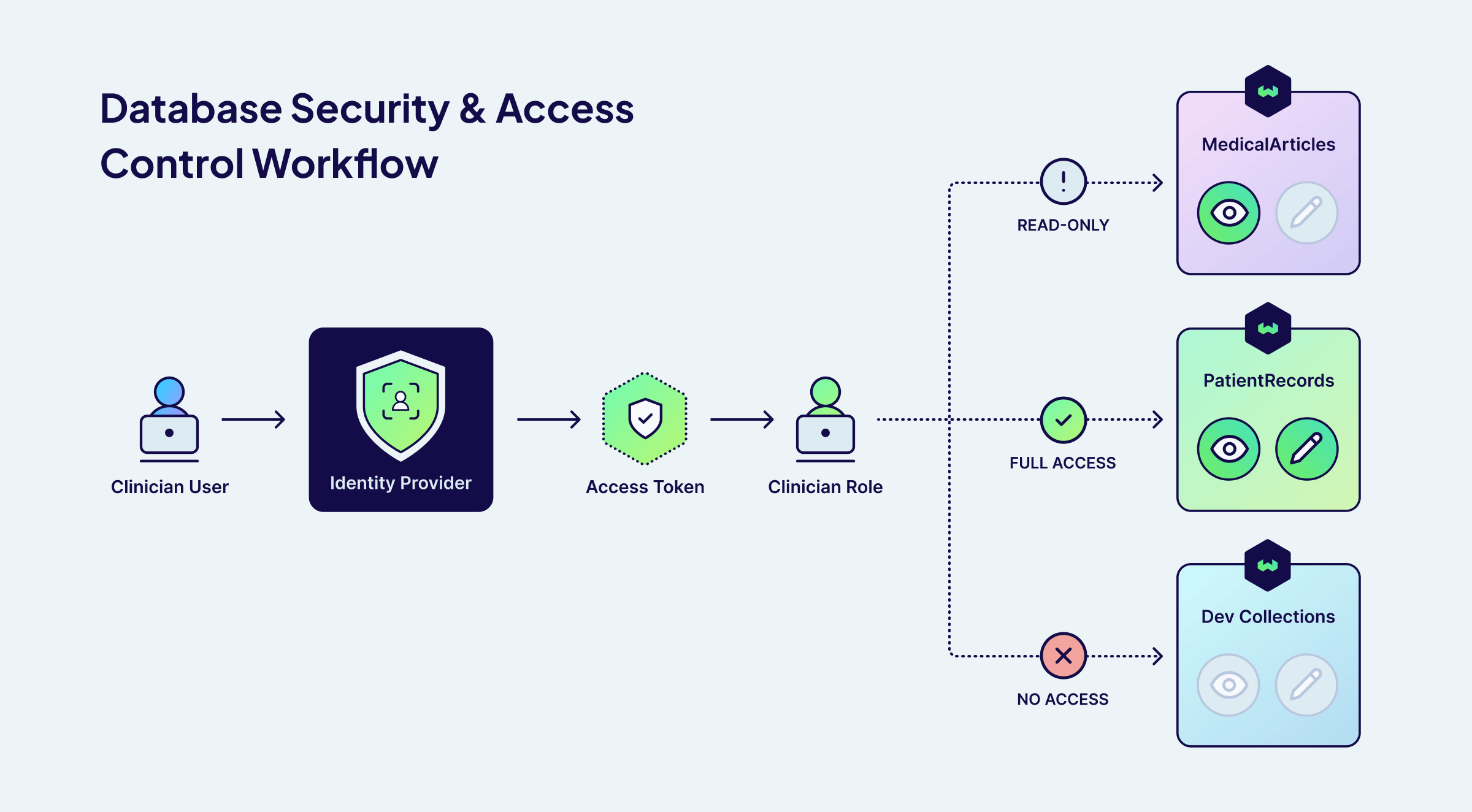
Their strict least-privilege model looks like this:
| Role | MedicalArticles | PatientRecords | Dev Collections | Manage RBAC Roles |
|---|---|---|---|---|
RoleManager | No Access | No Access | No Access | ✅ |
Clinician | Read only | Full CRUD | No Access | ❌ |
Researcher | Read only | No Access | Full CRUD | ❌ |
ClinicalSearchApp | Read only | No Access | No Access | ❌ |
In this setup, the patient-facing search application (ClinicalSearchApp) can only query medical articles — it has zero access to patient records. A researcher can read published literature for their models, but cannot touch patient records. Even if credentials are compromised, the blast radius is contained to the permissions of that specific role.
Notice that the RoleManager can create and assign roles but has zero access to any data — separating role administration from data access.
For MedVector, this meant their auditors could see directly in the configuration that the ClinicalSearchApp role had zero access to PatientRecords. No ambiguity, no "we think it's locked down" — the policy itself was the proof.
3. OIDC Groups: Scaling Role Management
"When employees change roles inside the company, how quickly are their access rights updated?"
At 80 employees, MedVector had been manually assigning Weaviate roles — and it was falling behind. When Dr. Chen moved from the clinical team to research, her old permissions lingered for two weeks before anyone noticed. They needed access that stayed in sync with reality.
OIDC Groups solve this by mapping your existing organizational structure directly to Weaviate roles. Your identity provider already knows who belongs to which teams. You can configure Weaviate to trust these group claims. When a user's group membership changes in your IdP (maybe they get promoted or switch teams), Weaviate automatically reflects this permission change on their next connection.
After MedVector mapped their IdP groups to Weaviate roles, the Dr. Chen problem disappeared. Moving her from Clinical-Staff to Research-Team in the IdP automatically updated her Weaviate permissions on next connection — zero manual intervention. Here's what their mapping looks like:
| IdP Group | Weaviate Role | Access Level |
|---|---|---|
Clinical-Staff | Clinician | Read articles, full access to patient records |
Research-Team | Researcher | Read articles, full dev access |
Access-Manager-Admin | RoleManager | Manage RBAC roles, no data access |
External-Contractors | DevOnly | Dev access only |
This setup gave MedVector zero-touch onboarding (a new clinician is added to the Clinical-Staff group and immediately gains the correct Weaviate access), instant revocation (removing a user from the group instantly revokes their specific privileges), and audit simplicity (auditors only need to check the IdP group membership).
Read more about OIDC group management in the official Weaviate documentation.
Assigning RBAC Roles to OIDC Groups
Once Weaviate is configured with a GROUPS_CLAIM (as shown in the OIDC setup above), you can create roles and assign them to IdP groups programmatically:
from weaviate.classes.rbac import Permissions

# Create a custom role
client.roles.create(
    role_name="Clinician",
    permissions=[
        # Read access to MedicalArticles
        Permissions.data(collection="MedicalArticles", read=True),
        # Full data access to PatientRecords
        Permissions.data(collection="PatientRecords", create=True, read=True, update=True, delete=True),
    ],
)

# Assign the role to an OIDC group (not individual users)
client.groups.oidc.assign_roles(
    group_id="Clinical-Staff",
    role_names=["Clinician"],
)
Now every member of the Clinical-Staff group in the IdP automatically inherits the Clinician role in Weaviate — no per-user provisioning required.
4. Multi-Tenant Security
"Can Hospital A's staff access Hospital B's records?"
Then MedVector signed their second hospital client. Now they needed to guarantee that Hospital A's patient data was invisible to Hospital B — without spinning up a separate Weaviate cluster for each customer.
Many enterprise deployments use Weaviate's multi-tenancy to isolate data for different customers, departments, or business units within a shared collection. RBAC integrates with multi-tenancy to provide tenant-level access control.
MedVector uses this to ensure that Hospital A's patient data is completely isolated from Hospital B's, even though both reside in the same Weaviate collection:
from weaviate.classes.rbac import Permissions

# Create a role scoped to a specific tenant
client.roles.create(
    role_name="HospitalA_Clinician",
    permissions=[
        Permissions.data(collection="PatientRecords", tenant="hospital_a", read=True),
    ],
)

# Assign the role to an OIDC group
client.groups.oidc.assign_roles(
    group_id="HospitalA-Clinicians",
    role_names=["HospitalA_Clinician"],
)
Requests from a user in the HospitalA-Clinicians group that attempt to access hospital_b tenant data are denied. This provides data isolation without requiring separate Weaviate clusters for each customer.
Permissions also support wildcards for flexible scoping. For example, tenant="hospital_*" grants access to all tenants matching that prefix — so an internal analyst role could query across hospital_a, hospital_b, and any future hospital tenants without updating the role every time a new client is onboarded.
Read more about managing RBAC permissions in the official Weaviate documentation.
5. Audit Logging and Compliance
"Show us every instance of PHI (Protected Health Information) access in the last 90 days."
Six months after they started, the auditors arrived. MedVector exported their audit logs, filtered by collection: PatientRecords, and handed over a complete trail — every access, every user, every decision. Audit passed.
In regulated industries, the burden of proof falls on you — everything needs to be logged. GDPR requires records of processing activities, HIPAA requires audit trails for all PHI access, and SOC 2 demands evidence of sensitive data access monitoring.
Weaviate provides comprehensive audit logging that tracks authentication events (successes and failures), RBAC checks (every permission grant or denial), role modifications (who changed permissions and when), and data access with full context on resources targeted.
Each audit log entry captures the full context of a security decision. Here is an example of the data captured in a single Weaviate audit log:
{
  "action": "authorize",
  "component": "RBAC",
  "level": "info",
  "permissions": [
    {
      "resource": "[Domain: data, Collection: PatientRecords, Tenant: hospital_a]",
      "results": "success"
    }
  ],
  "request_action": "R",
  "source_ip": "10.0.42.15",
  "time": "2026-02-19T14:32:05.123Z",
  "user": "dr.chen@hospital.org"
}
Read more about audit logging in the official Weaviate documentation.
6. Network Security
"Does patient data ever traverse the public internet?"
With the audit behind them, MedVector turned to their final compliance checkbox: ensuring the answer to that question was a definitive no.
Authentication and authorization protect against unauthorized logical access, but enterprise deployments also need to secure network-level access. Weaviate Cloud Dedicated deployments support PrivateLink (AWS) to ensure that traffic between your applications and Weaviate never traverses the public internet.
For self-hosted deployments, standard network security best practices apply: deploy Weaviate behind a reverse proxy or load balancer with TLS termination, restrict network access using firewall rules or Kubernetes network policies, and use Weaviate's TLS configuration to encrypt traffic in transit.
Weaviate Cloud: Shared vs. Dedicated
For teams getting started or running non-regulated workloads, Shared deployments provide strong baseline security with API keys, RBAC, and OIDC. For organizations with enterprise compliance requirements, network isolation needs, or large-scale IdP integration, Dedicated deployments provide the full security stack—including SSO, which lets your team authenticate to the Weaviate Cloud console with their corporate identity, eliminating separate credentials and ensuring access is synchronized with your IdP.
Weaviate Cloud offers two deployment tiers with different security capabilities:
| Feature | Shared Deployment | Dedicated (Premium) Deployment |
|---|---|---|
| API Key Authentication | ✅ | ✅ |
| Custom RBAC Roles | ✅ | ✅ |
| User Management | ✅ | ✅ |
| SSO / SAML for Console | ❌ | ✅ |
| PrivateLink / VPC Peering | ❌ | ✅ |
| Compliance (HIPAA) | ❌ | ✅ |
| Network Isolation | Shared infrastructure | Dedicated infrastructure |
| SLA Availability | 99.5% - 99.9% | 99.95% |
Read more about the different Weaviate Cloud deployments on our pricing page.
Weaviate Assurance for Self-Hosted Deployments
Not every enterprise wants a managed cloud — some need to run Weaviate in their own infrastructure for regulatory, data residency, or architectural reasons. Weaviate Assurance is a premium subscription that bridges the gap between self-hosted flexibility and managed-service reliability. It's built on four pillars:
- Enterprise Incident Response — 24x7 global coverage with P1 (critical) response in 1 hour, direct escalation to Weaviate core engineering, and root cause analysis for any failures.
- Proactive Expert Guidance — Bi-weekly office hours with Weaviate engineers for configuration guidance (vector index selection, query tuning, schema design, replication strategies) and architecture reviews as your data grows.
- Managed Lifecycle Support — Upgrade advisory for every Weaviate release (~9 per year), compatibility assessments for your specific environment, and end-of-life migration guidance for zero-downtime transitions.
- Dedicated Account Management — Private Slack channel, assigned account executive, and periodic business reviews to align Weaviate's roadmap with your project milestones.
For self-hosted teams implementing the security features covered in this post — OIDC integration, RBAC configuration, audit logging — Assurance provides the expert guidance to get it right the first time.
Contact us for a tailored quote based on your cluster footprint.
Implementation Roadmap
MedVector's journey from shared API keys to a passed HIPAA audit followed a predictable lifecycle. Here's the same path, generalized:
1. Discovery — Start by mapping your data sensitivity levels. Identify which Weaviate collections contain PII, regulated data, or IP-sensitive information. Catalog your existing IdP groups and determine how they map to logical roles (Administrator, Developer, Viewer, Service Account). This mapping exercise typically reveals gaps in your current access model.
2. Architecture — Define your custom roles in Weaviate, following the principle of least privilege. Use the RBAC documentation to create roles with granular, collection-level permissions. If you're using multi-tenancy, include tenant-level scoping. Document the mapping between IdP groups and Weaviate roles.
3. Integration — Configure OIDC in your IdP. For Entra ID, this means creating an App Registration and setting the appropriate redirect URIs. For Okta, create a new OIDC application. Update your Weaviate configuration with the issuer URL, client ID, and claims mapping as shown in the OIDC documentation. Test the token flow end-to-end in a staging environment before touching production.
4. Testing — Verify that adding a user to an IdP group grants the correct Weaviate permissions and that removing them revokes access. Test edge cases: what happens when a user belongs to multiple groups? When a token expires mid-session? Automate these tests so they run on every configuration change.
5. Operations — Configure log shipping to your SIEM and set up alerts for "Access Denied" spikes, administrative role changes, and unusual access patterns (e.g., a service account suddenly querying a new collection). Regularly review role assignments and remove stale permissions as teams evolve.
Conclusion
Enterprise security is about integration, not isolation. Weaviate meets enterprises where they are by integrating with existing identity providers, respecting organizational structures through OIDC groups, and providing compliance-ready audit trails.
The key enterprise security features covered in this guide:
- OIDC Integration that delegates authentication to your existing IdP
- OIDC Groups that map your org structure to access control with automatic provisioning and revocation
- Granular RBAC with collection-level and tenant-level permissions
- Multi-Tenant Security for data isolation within shared collections
- Audit Logging for compliance (SOC 2, HIPAA, GDPR)
- Network Security with PrivateLink, VPC Peering, and TLS encryption
- Cloud Deployment Options from shared to dedicated, with SSO for enterprise teams
MedVector didn't rip and replace their database as they grew from five engineers to a multi-hospital platform — they layered on security capabilities as the need arose. You can do the same. Start with basic RBAC, grow into IdP integration, and mature into full audit logging—all on the same platform.
Ready to secure your AI infrastructure? Schedule a consultation with Weaviate's enterprise team to discuss your specific IdP integration requirements.
Ready to start building?
Check out the Quickstart tutorial, or sign up for a free Weaviate Cloud account.
Don't want to miss another blog post?
Sign up for our bi-weekly newsletter to stay updated!
By submitting, I agree to the Terms of Service and Privacy Policy.