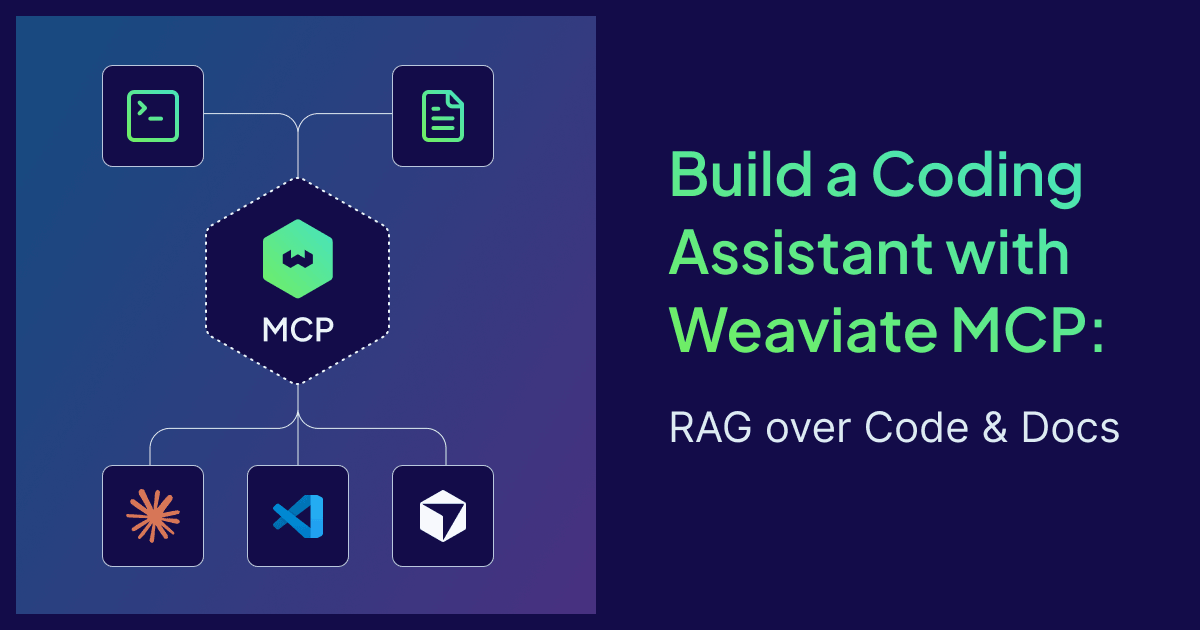
Last week I asked Claude Code to implement something relatively trivial in my codebase. Three turns in, the conversation used up >80K tokens and Claude was still missing some crucial information I'd forgotten to include. That's the loop you fall into without retrieval: paste too little and the agent guesses, paste too much and pay for context the agent isn't using.
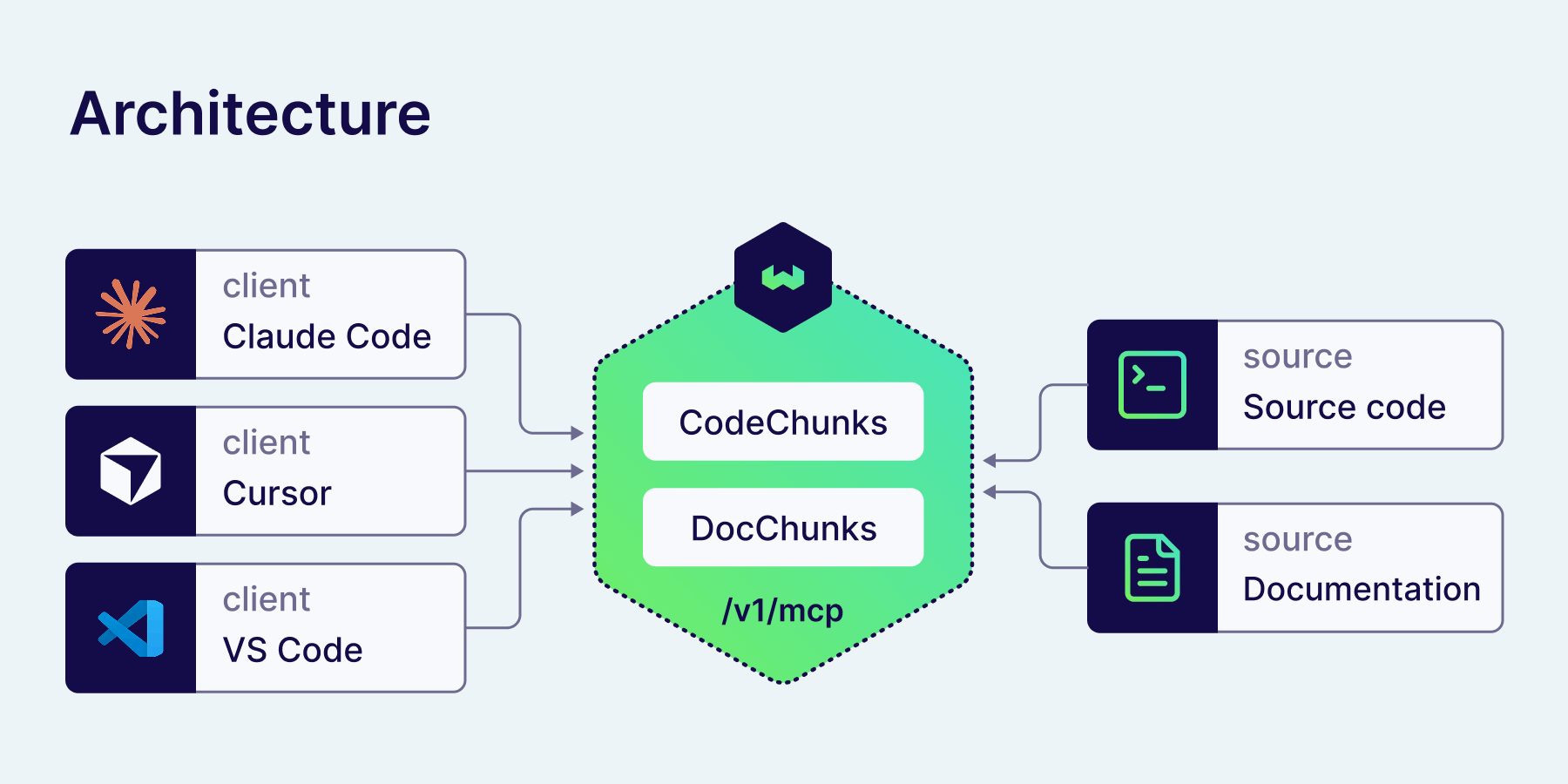
Most teams solve this with RAG over the codebase. The typical setup is a vector database plus a custom MCP server process bridging the two. Weaviate simplifies this: the MCP server is built into the database, at /v1/mcp on the same port as the REST API. One env var enables it. The same hybrid search you'd use for any other Weaviate workload powers code retrieval, with the BM25 half keeping function identifiers like connect_to_local matchable and the vector half finding semantic intent like "how do I init a client."
This post walks through building a coding assistant on top of that built-in MCP server: ingest a codebase, ingest its docs, connect Claude Code, Cursor, and VS Code, and run real queries. Topics covered:
- Why your coding assistant needs more than its training data
- Why Weaviate MCP fits this job
- Step 1: Run Weaviate with MCP enabled
- Step 2: Design the schema
- Step 3: Chunk and ingest the codebase
- Step 4: Chunk and ingest documentation
- Step 5: Connect Claude Code, Cursor, and VS Code
- Try it out
- Agent runbook: autonomous setup
Why your coding assistant needs more than its training data
LLMs ship with a fixed cutoff and zero knowledge of your private code. The naive workaround is to dump files into the prompt. That has three problems.
-
Cost: Tokens in context are billed. Every turn. A 200-file Python project doesn't fit, and even the parts that do are billed continuously while the agent reasons.
-
Stale context: Once a file is in the prompt, it's frozen. If the agent changes a function and then needs to read it again, it has to reload the whole file. There's no live link between the model's view and the on-disk truth.
-
Wrong granularity: Even when files fit, the model spends attention on the wrong parts. Imports. Module-level boilerplate. The function the agent is actually editing competes for context with a hundred lines of
from x import y.
Retrieval solves all three. Index the codebase once, store the chunks in a vector database, and let the LLM client pull only what it needs per query. That's RAG. Coding assistants haven't had a clean way to talk to such a database without a custom shim. That's where MCP comes in.
Why Weaviate MCP fits this job
The Model Context Protocol (MCP) is the standardized way for LLM clients like Claude Code, Cursor, and VS Code to call out to external tools. Weaviate v1.37.1 exposes its core operations as MCP tools directly, on a Streamable HTTP endpoint at /v1/mcp. Four tools are surfaced:
weaviate-collections-get-config— let the LLM inspect what collections exist and what properties they haveweaviate-tenants-list— list tenants when you're using multi-tenancyweaviate-query-hybrid— run hybrid (BM25 + vector) searchweaviate-objects-upsert— write objects back, only when write access is enabled
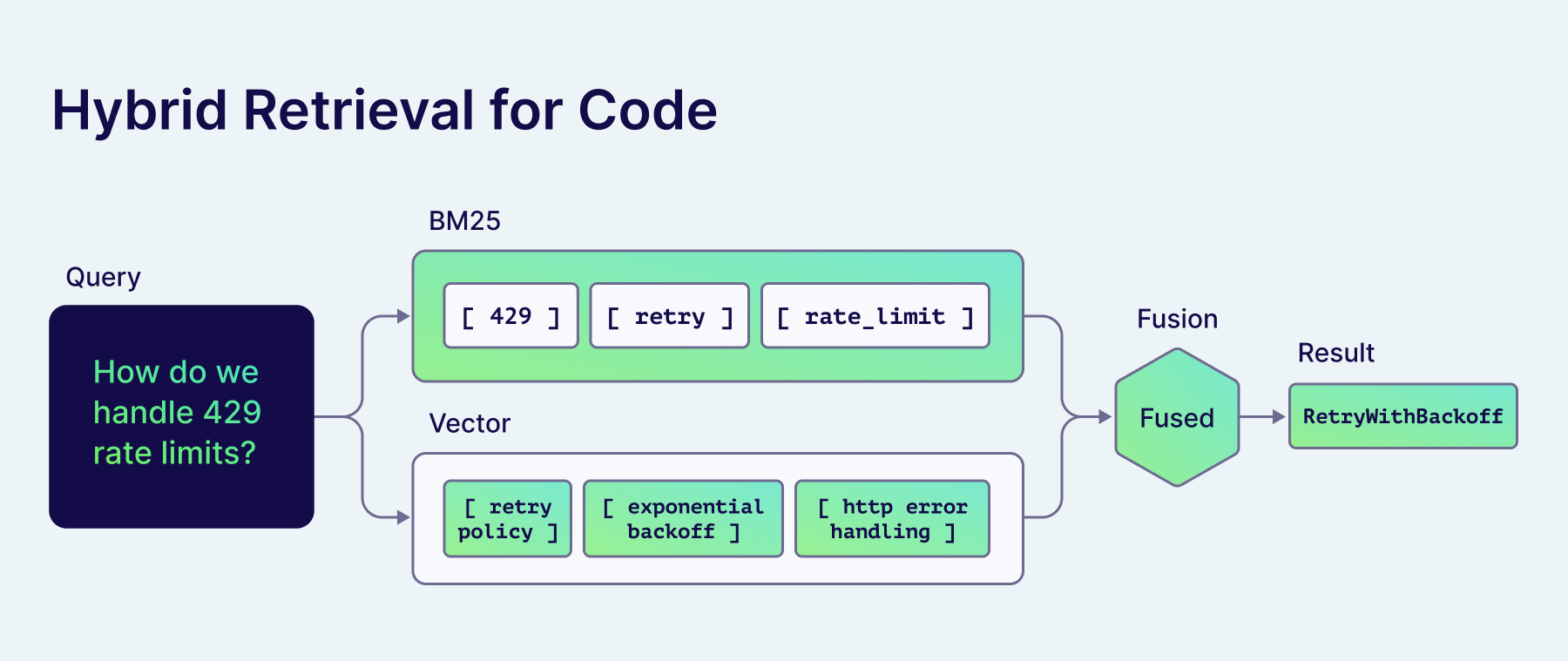
Hybrid search is the most concrete reason this stack works for a coding assistant. Code is a mix of identifiers and intent. BM25 nails the identifiers. Vectors nail the intent. A query like "where do we handle retry on 429?" wants both at once: vectors find the semantically related retry code, BM25 anchors on 429 as an exact token. Pure-vector retrieval drops the integer match. Pure-BM25 misses any wording the user didn't already know. Hybrid wins on this kind of mixed-intent query.
Operational simplicity is the second reason. Competing stacks run an MCP server alongside the vector database. That's a second service to watch in production. Weaviate ships the MCP server inside the database, on the same port, with the same auth. The thing you have to monitor is just Weaviate.
The third reason is multi-tenancy. One Weaviate instance can hold many codebases, each isolated as a tenant. For an organization with multiple repos, that's one cluster instead of one-per-team.
Weaviate MCP vs function calling comes up as a natural question. Function calling is per-LLM-API. MCP is transport-level: any client that speaks MCP can call any server that speaks MCP, no rewrites. Build the retrieval once, use it from Claude Code, Cursor, and VS Code without translating.
Step 1: Run Weaviate with MCP enabled
The MCP server is disabled by default. Two environment variables turn it on:
# docker-compose.yml
services:
  weaviate:
    image: cr.weaviate.io/semitechnologies/weaviate:1.38.8
    ports:
      - '8080:8080'
      - '50051:50051'
    environment:
      MCP_SERVER_ENABLED: 'true'
      MCP_SERVER_WRITE_ACCESS_ENABLED: 'true'
      AUTHENTICATION_ANONYMOUS_ACCESS_ENABLED: 'true'
      DEFAULT_VECTORIZER_MODULE: 'text2vec-openai'
      ENABLE_MODULES: 'text2vec-openai'
      OPENAI_APIKEY: ${OPENAI_APIKEY}
MCP_SERVER_ENABLED exposes the read tools (config, tenants, hybrid query). MCP_SERVER_WRITE_ACCESS_ENABLED adds the upsert tool, which lets the agent write findings back. Skip it if you only want retrieval.
Honestly, I'd skip it for a while even if you think you want write-back. Read-only MCP covers most of what a coding agent actually does, and you sidestep a class of failure modes where the agent writes nonsense back into your knowledge base. Turn write access on once you have a specific use case that justifies the risk.
This example uses AUTHENTICATION_ANONYMOUS_ACCESS_ENABLED: 'true' so the post stays focused on the MCP wiring. For any networked deployment, enable an API key and add Authorization: Bearer <key> to your client config — Weaviate's MCP server respects standard auth and RBAC. See §"Going further" for the RBAC permissions involved.
Bring it up and confirm the endpoint is alive. Streamable HTTP requires an initialize handshake before any other call, so the liveness probe sends one:
docker compose up -d
curl -sf -X POST http://localhost:8080/v1/mcp \
  -H 'Content-Type: application/json' \
  -H 'Accept: application/json, text/event-stream' \
  -d '{
    "jsonrpc":"2.0","id":0,"method":"initialize",
    "params":{
      "protocolVersion":"2025-03-26",
      "capabilities":{},
      "clientInfo":{"name":"curl","version":"1"}
    }
  }'
A live MCP server returns a JSON-RPC envelope describing the server's capabilities and sets an Mcp-Session-Id response header that subsequent calls must echo back. You don't need to parse the body for a sanity check — a non-empty response is enough. If you get a connection refused or a 404, MCP isn't enabled.
Step 2: Design the schema
Two collections, one for code chunks and one for documentation chunks, sharing the same Weaviate instance:
import weaviate
from weaviate.classes.config import Property, DataType, Tokenization, Configure

client = weaviate.connect_to_local()

client.collections.create(
    name="CodeChunks",
    properties=[
        Property(name="content", data_type=DataType.TEXT,
                 tokenization=Tokenization.WORD),
        Property(name="symbol", data_type=DataType.TEXT,
                 tokenization=Tokenization.LOWERCASE),
        Property(name="file_path", data_type=DataType.TEXT,
                 tokenization=Tokenization.FIELD),
        Property(name="language", data_type=DataType.TEXT,
                 tokenization=Tokenization.FIELD),
        Property(name="repo", data_type=DataType.TEXT,
                 tokenization=Tokenization.FIELD),
    ],
    vector_config=Configure.Vectors.text2vec_openai(),
)

client.collections.create(
    name="DocChunks",
    properties=[
        Property(name="content", data_type=DataType.TEXT,
                 tokenization=Tokenization.WORD),
        Property(name="title", data_type=DataType.TEXT,
                 tokenization=Tokenization.WORD),
        Property(name="source_url", data_type=DataType.TEXT,
                 tokenization=Tokenization.FIELD),
    ],
    vector_config=Configure.Vectors.text2vec_openai(),
)
The tokenization choices matter. symbol uses lowercase so connect_to_local is one token instead of three. file_path, language, and repo use field so they match exactly. Prose properties (content, title) use word. If this section feels familiar, the tokenization post explains why each method belongs where.
Step 3: Chunk and ingest the codebase
Naive line-based chunking destroys code. A function split across two chunks loses its signature on one side and its body on the other. The fix is to chunk along syntactic boundaries: one chunk per function, one per class, one per top-level statement.
Python's standard library is enough for Python code (no extra dependency). For other languages, tree-sitter is the standard choice (10+ languages, AST-aware, fast).
import ast
from pathlib import Path

def chunk_python_file(path: Path) -> list[dict]:
    """Emit one chunk per top-level function or class."""
    source = path.read_text()
    tree = ast.parse(source)
    lines = source.splitlines()
    chunks = []
    for node in ast.iter_child_nodes(tree):
        if isinstance(node, (ast.FunctionDef, ast.AsyncFunctionDef, ast.ClassDef)):
            start = node.lineno - 1
            end = node.end_lineno
            chunks.append({
                "content": "\n".join(lines[start:end]),
                "symbol": node.name,
                "file_path": str(path),
                "language": "python",
                "repo": "my-service",
            })
    return chunks
Ingest with server-side batching. data.ingest() takes any iterable, so a generator expression over the repo streams chunks to the server as they are produced, at whatever pace the server asks for:
code_chunks = client.collections.use("CodeChunks")

code_chunks.data.ingest(
    chunk
    for py_file in Path("./src").rglob("*.py")
    for chunk in chunk_python_file(py_file)
)
Weaviate vectorizes each chunk on insert via the configured text2vec-openai module, so there's no separate embedding step. Replace the vectorizer with text2vec-voyageai (Voyage's voyage-code-2 is purpose-built for code) or text2vec-cohere if you want a different embedding family.
Step 4: Chunk and ingest documentation
Prose chunks differently. Headings are real boundaries. A useful default is "split on H2, then on H3 if a section is too long":
import re

def chunk_markdown(text: str, max_chars: int = 1500) -> list[str]:
    sections = re.split(r"(?m)^## ", text)
    chunks = []
    for section in sections:
        if len(section) <= max_chars:
            chunks.append(section.strip())
        else:
            for sub in re.split(r"(?m)^### ", section):
                chunks.append(sub.strip())
    return [c for c in chunks if c]

doc_chunks = client.collections.use("DocChunks")

doc_chunks.data.ingest(
    {
        "content": content,
        "title": md_file.stem,
        "source_url": f"https://docs.example.com/{md_file.stem}",
    }
    for md_file in Path("./docs").rglob("*.md")
    for content in chunk_markdown(md_file.read_text())
)
Two collections, two chunking strategies, one Weaviate instance. The MCP server exposes both through the same weaviate-query-hybrid tool. The agent picks which collection to query.
Step 5: Connect Claude Code, Cursor, and VS Code
The MCP transport is HTTP, so client config is small. Each client has its own file. All three point at the same Weaviate endpoint.
Claude Code (~/.claude.json):
{
  "mcpServers": {
    "weaviate": {
      "type": "http",
      "url": "http://localhost:8080/v1/mcp"
    }
  }
}
Or via the CLI:
claude mcp add weaviate http://localhost:8080/v1/mcp --transport http
Cursor (~/.cursor/mcp.json or project-local .cursor/mcp.json):
{
  "mcpServers": {
    "weaviate": {
      "url": "http://localhost:8080/v1/mcp"
    }
  }
}
VS Code with Copilot (.vscode/mcp.json):
{
  "servers": {
    "weaviate": {
      "type": "http",
      "url": "http://localhost:8080/v1/mcp"
    }
  }
}
Restart the client. The Weaviate tools (weaviate-query-hybrid, weaviate-collections-get-config, etc.) should appear in the client's tool list. If they don't, check that MCP_SERVER_ENABLED=true is set and that the port is reachable.
Try it out
Open Claude Code in any directory after the runbook below has finished. Ask something specific to FastAPI internals that a generic model would only paraphrase from training data:
"How does FastAPI handle dependency injection — show me the actual resolver."
Without MCP, Claude Code paraphrases the FastAPI dependency injection docs from training. With MCP, it calls weaviate-query-hybrid against CodeChunks, the BM25 half nails identifiers like Depends and solve_dependencies, the vector half pulls in nearby resolver code, and the answer cites real lines from fastapi/dependencies/utils.py.
Try a docs query:
"When should I use
async defversusdefin FastAPI route handlers?"
Same shape, different collection. The agent queries DocChunks, returns the relevant section from FastAPI's async def versus def guide, and answers with the actual recommendation rather than guessing.
The general pattern: the agent decides per-question whether code, docs, or both are relevant, and pulls the chunks that are. Context size stays bounded. The repo can be huge.
Agent runbook: autonomous setup
The narrative above is for humans. If you are an agent (Claude Code, Cursor, or any MCP-aware assistant) executing this end-to-end, the dropdown below is the contract: ordered steps, full scripts, success criteria. Run them in order. Each step prints a marker the next step can check.
Autonomous setup runbook — copy these scripts, run in order
Inputs
This runbook uses FastAPI as the demo codebase. It's well-known, ~30K LOC of Python with substantial MkDocs documentation, and matches both chunkers in the script (Python AST for source, heading-aware split for Markdown). Replace the clone target with any other repo to ingest your own.
Clone the demo repo and define environment variables:
# Clone FastAPI as the demo target
git clone --depth=1 https://github.com/fastapi/fastapi.git /tmp/fastapi

export WEAVIATE_DIR="$HOME/weaviate-code-assistant"   # where docker-compose.yml lives
export CODE_DIR="/tmp/fastapi/fastapi"                 # FastAPI Python source
export DOCS_DIR="/tmp/fastapi/docs/en/docs"            # FastAPI English MkDocs content
export OPENAI_APIKEY="sk-..."                          # required for the text2vec-openai vectorizer
If OPENAI_APIKEY is unset, stop and ask. Do not proceed with a placeholder.
Step 1: Provision and start Weaviate
Save the following as $WEAVIATE_DIR/setup.sh, make it executable, and run it. Idempotent: re-running on an already-up instance is a no-op.
#!/usr/bin/env bash
set -euo pipefail

mkdir -p "$WEAVIATE_DIR"
cd "$WEAVIATE_DIR"

cat > docker-compose.yml <<'YAML'
services:
  weaviate:
    image: cr.weaviate.io/semitechnologies/weaviate:1.38.8
    ports:
      - "8080:8080"
      - "50051:50051"
    environment:
      MCP_SERVER_ENABLED: 'true'
      MCP_SERVER_WRITE_ACCESS_ENABLED: 'true'
      AUTHENTICATION_ANONYMOUS_ACCESS_ENABLED: 'true'
      PERSISTENCE_DATA_PATH: '/var/lib/weaviate'
      DEFAULT_VECTORIZER_MODULE: 'text2vec-openai'
      ENABLE_MODULES: 'text2vec-openai'
      OPENAI_APIKEY: ${OPENAI_APIKEY}
    volumes:
      - weaviate-data:/var/lib/weaviate
volumes:
  weaviate-data:
YAML

docker compose up -d

# Wait for the REST API to come up (max 60s)
for i in {1..30}; do
  if curl -sf http://localhost:8080/v1/.well-known/ready > /dev/null; then
    echo "STEP_1_READY"
    break
  fi
  sleep 2
done

# Verify the MCP endpoint is reachable. Streamable HTTP requires an
# initialize handshake first; tools/list then needs the Mcp-Session-Id
# header returned by initialize.
SID=$(curl -s -i -X POST http://localhost:8080/v1/mcp \
  -H 'Content-Type: application/json' \
  -H 'Accept: application/json, text/event-stream' \
  -d '{"jsonrpc":"2.0","id":0,"method":"initialize","params":{
        "protocolVersion":"2025-03-26","capabilities":{},
        "clientInfo":{"name":"curl","version":"1"}}}' \
  | awk -F': ' 'tolower($1)=="mcp-session-id"{print $2}' | tr -d '\r\n')

if [ -z "$SID" ]; then
  echo "STEP_1_MCP_FAILED: no Mcp-Session-Id returned. MCP may be disabled."
  exit 1
fi

curl -sf -o /dev/null -X POST http://localhost:8080/v1/mcp \
  -H 'Content-Type: application/json' \
  -H 'Accept: application/json, text/event-stream' \
  -H "Mcp-Session-Id: $SID" \
  -d '{"jsonrpc":"2.0","id":1,"method":"tools/list"}' \
  && echo "STEP_1_MCP_OK" \
  || { echo "STEP_1_MCP_FAILED"; exit 1; }
Success criteria: stdout contains both STEP_1_READY and STEP_1_MCP_OK. If only STEP_1_READY shows, MCP is disabled or the version is wrong.
Step 2: Create collections and ingest data
Save the following as $WEAVIATE_DIR/ingest.py and run it with python3 ingest.py. Idempotent: collections that already exist are reused; objects are inserted (duplicates may accumulate, see note at end).
#!/usr/bin/env python3
"""Ingest a codebase and its docs into Weaviate. Run after setup.sh."""
import ast
import os
import re
import sys
from pathlib import Path

import weaviate
from weaviate.classes.config import Property, DataType, Tokenization, Configure

CODE_DIR = Path(os.environ["CODE_DIR"]).resolve()
DOCS_DIR = Path(os.environ.get("DOCS_DIR", CODE_DIR)).resolve()
REPO_LABEL = CODE_DIR.name

client = weaviate.connect_to_local()
try:
    # ---- Schema (idempotent) ----
    if not client.collections.exists("CodeChunks"):
        client.collections.create(
            name="CodeChunks",
            properties=[
                Property(name="content", data_type=DataType.TEXT, tokenization=Tokenization.WORD),
                Property(name="symbol", data_type=DataType.TEXT, tokenization=Tokenization.LOWERCASE),
                Property(name="file_path", data_type=DataType.TEXT, tokenization=Tokenization.FIELD),
                Property(name="language", data_type=DataType.TEXT, tokenization=Tokenization.FIELD),
                Property(name="repo", data_type=DataType.TEXT, tokenization=Tokenization.FIELD),
            ],
            vector_config=Configure.Vectors.text2vec_openai(),
        )
    if not client.collections.exists("DocChunks"):
        client.collections.create(
            name="DocChunks",
            properties=[
                Property(name="content", data_type=DataType.TEXT, tokenization=Tokenization.WORD),
                Property(name="title", data_type=DataType.TEXT, tokenization=Tokenization.WORD),
                Property(name="source_url", data_type=DataType.TEXT, tokenization=Tokenization.FIELD),
            ],
            vector_config=Configure.Vectors.text2vec_openai(),
        )

    # ---- Code: AST-chunk every .py file ----
    code = client.collections.use("CodeChunks")
    code_count = 0
    with code.batch.stream() as batch:
        for py in CODE_DIR.rglob("*.py"):
            if any(part.startswith(".") or part in ("node_modules", "venv", ".venv", "__pycache__") for part in py.parts):
                continue
            try:
                source = py.read_text(encoding="utf-8")
                tree = ast.parse(source)
            except (SyntaxError, UnicodeDecodeError):
                continue
            lines = source.splitlines()
            for node in ast.iter_child_nodes(tree):
                if isinstance(node, (ast.FunctionDef, ast.AsyncFunctionDef, ast.ClassDef)):
                    chunk = "\n".join(lines[node.lineno - 1:node.end_lineno])
                    batch.add_object(properties={
                        "content": chunk,
                        "symbol": node.name,
                        "file_path": str(py),
                        "language": "python",
                        "repo": REPO_LABEL,
                    })
                    code_count += 1
    print(f"STEP_2_CODE_CHUNKS={code_count}")

    # ---- Docs: heading-chunk every .md file ----
    docs = client.collections.use("DocChunks")
    doc_count = 0
    with docs.batch.stream() as batch:
        for md in DOCS_DIR.rglob("*.md"):
            if any(part.startswith(".") for part in md.parts):
                continue
            try:
                text = md.read_text(encoding="utf-8")
            except UnicodeDecodeError:
                continue
            sections = re.split(r"(?m)^## ", text)
            for sec in sections:
                sec = sec.strip()
                if not sec:
                    continue
                if len(sec) > 1500:
                    for sub in re.split(r"(?m)^### ", sec):
                        sub = sub.strip()
                        if sub:
                            batch.add_object(properties={
                                "content": sub,
                                "title": md.stem,
                                "source_url": f"file://{md.resolve()}",
                            })
                            doc_count += 1
                else:
                    batch.add_object(properties={
                        "content": sec,
                        "title": md.stem,
                        "source_url": f"file://{md.resolve()}",
                    })
                    doc_count += 1
    print(f"STEP_2_DOC_CHUNKS={doc_count}")

    if code_count + doc_count == 0:
        print("STEP_2_FAILED: no chunks ingested. Check CODE_DIR / DOCS_DIR paths.", file=sys.stderr)
        sys.exit(2)
    print("STEP_2_INGEST_OK")
finally:
    client.close()
Success criteria: stdout contains STEP_2_INGEST_OK and the chunk counts are non-zero. If both counts are zero, the input paths point to empty or unsupported content.
Note on idempotency: re-running this script appends objects rather than upserting. For a clean re-ingest, delete the collections first:
curl -X DELETE http://localhost:8080/v1/schema/CodeChunks
curl -X DELETE http://localhost:8080/v1/schema/DocChunks
Step 3: Wire up the LLM client
Pick the block matching the agent's host client. All three point at the same Weaviate endpoint.
Claude Code (preferred, single command):
claude mcp add weaviate http://localhost:8080/v1/mcp --transport http
If the claude CLI is not on PATH, write the config directly:
python3 -c '
import json, os, pathlib
p = pathlib.Path(os.path.expanduser("~/.claude.json"))
data = json.loads(p.read_text()) if p.exists() else {}
data.setdefault("mcpServers", {})["weaviate"] = {
    "type": "http",
    "url": "http://localhost:8080/v1/mcp"
}
p.write_text(json.dumps(data, indent=2))
print("STEP_3_CLAUDE_OK")
'
Cursor (~/.cursor/mcp.json):
python3 -c '
import json, os, pathlib
p = pathlib.Path(os.path.expanduser("~/.cursor/mcp.json"))
p.parent.mkdir(parents=True, exist_ok=True)
data = json.loads(p.read_text()) if p.exists() else {}
data.setdefault("mcpServers", {})["weaviate"] = {"url": "http://localhost:8080/v1/mcp"}
p.write_text(json.dumps(data, indent=2))
print("STEP_3_CURSOR_OK")
'
VS Code with Copilot (project-local .vscode/mcp.json):
mkdir -p .vscode
cat > .vscode/mcp.json <<'JSON'
{
  "servers": {
    "weaviate": {
      "type": "http",
      "url": "http://localhost:8080/v1/mcp"
    }
  }
}
JSON
echo "STEP_3_VSCODE_OK"
Success criteria: the appropriate STEP_3_*_OK marker prints, and the next interactive turn surfaces a weaviate-query-hybrid tool in the client's tool list. If the tool does not appear, restart the client.
Step 4: Verify retrieval works
This block confirms end-to-end retrieval without involving the LLM client. Streamable HTTP again needs the initialize handshake first so the session ID can be reused on the actual tools/call. Replace the query string with something the agent expects to be in the ingested codebase.
SID=$(curl -s -i -X POST http://localhost:8080/v1/mcp \
  -H 'Content-Type: application/json' \
  -H 'Accept: application/json, text/event-stream' \
  -d '{"jsonrpc":"2.0","id":0,"method":"initialize","params":{
        "protocolVersion":"2025-03-26","capabilities":{},
        "clientInfo":{"name":"curl","version":"1"}}}' \
  | awk -F': ' 'tolower($1)=="mcp-session-id"{print $2}' | tr -d '\r\n')

curl -sX POST http://localhost:8080/v1/mcp \
  -H 'Content-Type: application/json' \
  -H 'Accept: application/json, text/event-stream' \
  -H "Mcp-Session-Id: $SID" \
  -d '{
    "jsonrpc":"2.0",
    "id":1,
    "method":"tools/call",
    "params":{
      "name":"weaviate-query-hybrid",
      "arguments":{
        "collection_name":"CodeChunks",
        "query":"how does FastAPI handle dependency injection",
        "limit":3
      }
    }
  }' | python3 -m json.tool
Success criteria: the response contains a result key with non-empty content and the matched chunks reference real files in $CODE_DIR. If the response is empty, ingest produced zero matchable chunks for this query — try a query you know is in the codebase.
Done
The agent now has hybrid search over the ingested codebase and docs. From the LLM client, queries that previously hallucinated will instead return citations from real files. To re-ingest after the codebase changes, delete the two collections (curl block above) and re-run ingest.py.
Going further
A few directions worth picking up after the basics work:
-
Multi-repo organizations: Switch the schema to multi-tenant and create one tenant per repo. The
weaviate-tenants-listMCP tool gives the agent a way to discover them. -
Auth and RBAC: Weaviate's MCP server respects standard authentication. Three RBAC permissions (
read_mcp,create_mcp,update_mcp) control who can do what. Hand out read-only MCP credentials to most users; reserve write access for trusted agents. -
Agent write-back: With write access on, the agent can persist its own findings (postmortem notes, cross-references it discovered, summaries of long-running work) back into Weaviate. The next session inherits them. This is what shifts Weaviate from a passive retrieval engine into long-term memory for the coding agent.
-
Embedding choice:
text2vec-openaiis fine for most code. Voyage'svoyage-code-2is better if you can swap it in. For fully local setups, point Weaviate at an Ollama-served embedding model.
Summary
A coding assistant that doesn't know your code is a generic chatbot. The build is straightforward: index the codebase along syntactic boundaries, index the docs along heading boundaries, point your LLM client at the database via MCP, and let the agent retrieve only what it needs per query.
Weaviate simplifies this setup by running the MCP server inside the database. Hybrid search and multi-tenancy are enabled in the MCP service by default and writing directly to the database is one env var away. Spin it up, point Claude Code at it, and start asking questions about your actual code.
To go deeper:
- The Weaviate MCP server release notes
- The
weaviate/mcp-server-weaviateGitHub repository - The official MCP protocol docs
- The tokenization post for the per-property tokenization rationale
- Related blog posts: What is agentic RAG and Hybrid search explained
Ready to start building?
Check out the Quickstart tutorial, or sign up for a free Weaviate Cloud account.